How to Set a Trailing Stop in MT4 (Desktop and Mobile)
A trailing stop is a stop loss that follows price as a trade moves in your favour, locking in profit without you having to move the stop by hand. In MetaTrader 4 it takes about ten seconds to set, but there are a few traps that catch almost every new trader: the distance is measured in points, not pips, it only works while your terminal is running, and the mobile app does not offer it at all. This guide walks through the exact steps on desktop, explains what to do on mobile, and shows how to choose a trailing distance that fits the market instead of guessing.
What a Trailing Stop Actually Does
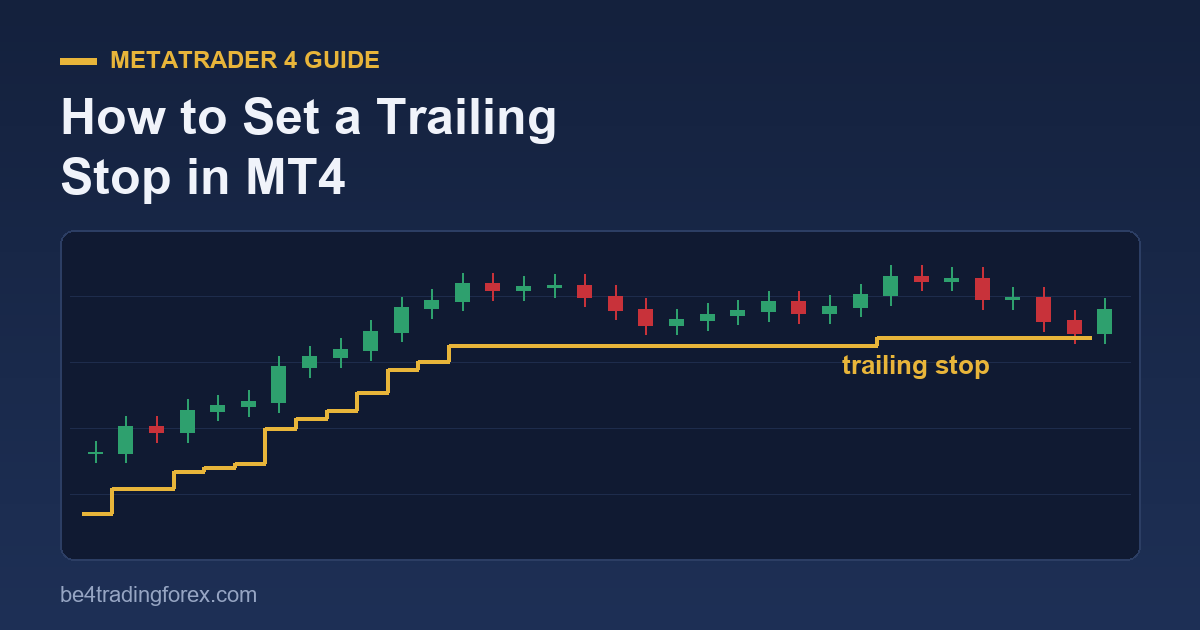
When you place a normal stop loss, it stays where you put it. A trailing stop sits a fixed distance behind the current price and moves only in the direction of your profit:
- Long (buy) trade: every time price makes a new high, the stop moves up to stay the same distance below it. If price falls back, the stop does not move down.
- Short (sell) trade: every time price makes a new low, the stop moves down to stay the same distance above it. If price rises, the stop stays put.
The result is a one-way ratchet. You keep the upside of a strong move while the amount you can give back shrinks as the trade matures. That is why trailing stops are a core tool for trend followers and for anyone who struggles to “let winners run” (a classic problem covered in our guide to the psychology of forex trading).
How to Set a Trailing Stop in MT4 (Desktop)
A trailing stop in MT4 is attached to an open position. You cannot add it to a pending order before it triggers.
- Open the Terminal window (press Ctrl+T or go to View → Terminal).
- Click the Trade tab to see your open positions.
- Right-click the position you want to protect.
- Hover over Trailing Stop in the menu.
- Pick one of the preset distances (15, 20, 25 points and so on) or choose Custom and type your own value.
That is it. A small mark appears next to the trade, and the Journal tab will log a line each time MT4 modifies the stop. To remove it, right-click the position again and choose Trailing Stop → None. To remove trailing stops from every open trade at once, choose Delete All.
Points vs pips: the most common mistake
MT4 measures the trailing distance in points, the smallest price increment your broker quotes. Most brokers now quote five decimal places on pairs like EUR/USD (1.08452) and three on yen pairs (157.384). On those quotes, 10 points = 1 pip.
| You want to trail by | Enter in MT4 (5-digit broker) | Enter in MT4 (4-digit broker) |
|---|---|---|
| 15 pips | 150 | 15 |
| 25 pips | 250 | 25 |
| 50 pips | 500 | 50 |
If you pick “15 points” from the preset list on a five-digit account, you are trailing by just 1.5 pips, which will close the trade on the first bit of normal noise. Always check how many decimals your symbol shows before you choose a value. MT4 also enforces a minimum of 15 points, and some brokers impose a larger “stop level” on certain symbols.
When does the trailing stop start moving?
A detail many traders miss: MT4 does not start trailing the moment you activate it. It begins only after the trade is in profit by at least the trailing distance. If you set a 30-pip trail on a trade that is currently 10 pips up, nothing happens until price is 30 pips in your favour. At that point the stop jumps to your entry price (break-even) and follows from there. Until then, your original stop loss, if you set one, stays in charge. So always keep a normal stop loss on the trade as well.
The Big Limitation: Your Terminal Must Stay Open
This is the part that surprises people. In MT4 the trailing stop runs inside your own terminal, not on the broker’s server. Your computer watches price and sends a “modify stop” request each time the stop needs to move. If you close MetaTrader, lose your internet connection, or your PC goes to sleep, the trailing stops stop moving. The stop stays wherever it was last placed, which is still protection, but it no longer follows price.
There are three practical ways to deal with this:
- Run MT4 on a VPS. A virtual private server keeps the terminal online around the clock. Many brokers offer one free above a certain account size.
- Use a trailing-stop Expert Advisor. An EA can apply trailing rules your way (ATR-based, break-even first, partial close). It still needs the terminal running, so pair it with a VPS for overnight trades.
- Manage trailing manually at fixed check-ins. For swing trades on the daily chart, moving the stop once a day under the latest swing low works perfectly well and needs no software.
Can You Set a Trailing Stop on the MT4 Mobile App?
No. The MT4 apps for Android and iPhone let you open, close and modify trades and set a normal stop loss and take profit, but they do not have a trailing-stop option. (Searches like “trailing stop MT4 mobile” are common for exactly this reason.) Your options are:
- Set the trailing stop from a desktop or VPS terminal logged into the same account. It will keep working while that terminal is online, and you can watch the stop move from your phone.
- Move the stop loss manually in the app: tap the position, choose Modify, and drag or type the new stop level as price advances.
How Far Should You Trail? Four Methods That Work
A fixed number picked at random is the weakest way to trail. The right distance depends on how much the pair normally moves and on your timeframe. Here are four approaches, from simplest to most adaptive.
1. Fixed distance
Choose one distance and use it on every trade, for example 20 pips on a 15-minute EUR/USD scalp. Easy to apply in MT4, but it ignores volatility: 20 pips is generous on a quiet Asian session and far too tight on a news day.
2. ATR-based distance
The Average True Range (ATR) tells you the pair’s typical range per candle. Trailing by 1.5 to 3 times the ATR of your trading timeframe keeps the stop outside normal noise while still protecting profit. If the 1-hour ATR(14) on GBP/USD reads 0.00180 (18 pips), a 2×ATR trail is 36 pips, entered as 360 points on a five-digit broker. Re-check the ATR each session, because volatility changes.
3. Swing highs and lows
For a long trade, move the stop just below each new higher low; for a short, just above each new lower high. This follows the market’s own structure and gives the trade room to breathe during pullbacks. It cannot be automated with MT4’s built-in trailing stop, so it is done by hand or with an EA. It pairs naturally with dynamic support and resistance.
4. Moving average trail
Trail the stop just beyond a moving average, such as the 20 EMA on your chart. While the trend is intact, price tends to respect the average; a close on the other side is your exit. Our moving averages guide explains which lengths suit which timeframes.
A Simple Trailing Plan You Can Copy
- Enter with a normal stop loss placed at a logical level (beyond a swing point or about 1.5×ATR).
- When the trade is in profit by the same distance as your initial risk (1R), move the stop to break-even.
- From there, trail at 2×ATR of your timeframe, or under each new swing low/above each new swing high.
- Optional: close half the position at 2R and let the rest run on the trailing stop.
This keeps your worst case defined from the start, removes risk once the trade proves itself, and still lets the occasional big trend pay for several small losses. It fits neatly into the rules in our risk management guide.
Common Trailing Stop Mistakes
- Trailing too tight. A stop inside normal noise turns good trades into small losses. Use ATR to sanity-check your distance.
- Confusing points with pips. On five-digit quotes, multiply your pip distance by 10.
- Relying on it overnight with the PC off. Without a running terminal the stop freezes.
- Removing the initial stop loss. The trailing stop only kicks in once you are in profit by the trailing distance.
- Trailing during major news. Spreads widen and price spikes; a tight trail can be hit by a single tick. Widen it or step aside.
Watch: Setting a Trailing Stop in MT4
Prefer to see it on screen? These short videos from our library show the process step by step:
- Setting a trailing stop on the MT4 platform
- How to use trailing stops
- Using trailing stops to maximise profits
- How to trail a stop loss
Frequently Asked Questions
Does a trailing stop work when MT4 is closed?
No. The stop stays at its last position but stops moving. Keep the terminal running, ideally on a VPS, for trailing to continue.
What is the minimum trailing stop in MT4?
15 points, which is 1.5 pips on a five-digit broker. Your broker may set a higher minimum stop level on some symbols.
Can I add a trailing stop to a pending order?
Not in MT4. Wait for the order to fill, then right-click the open position in the Trade tab.
Is a trailing stop better than a fixed take profit?
Neither is better in every case. Take profits suit range-bound markets with clear targets; trailing stops suit trends where you cannot know how far price will run. Many traders combine them: take partial profit at a target and trail the rest.
Trading forex on margin carries a high level of risk and may not be suitable for all investors. This guide is educational and is not financial advice.
Keep learning