Parabolic SAR Indicator: Settings, Signals and 4 Forex Strategies
The Parabolic SAR is one of the easiest indicators to read: a trail of dots below price in an uptrend and above price in a downtrend. When price crosses the dots, they jump to the other side. That simplicity makes it popular for trend following, trailing stops and scalping, but it also makes it easy to misuse in sideways markets. This guide explains how the Parabolic SAR is calculated, which settings to use, how to read its signals and four practical ways to trade it in MetaTrader 4.
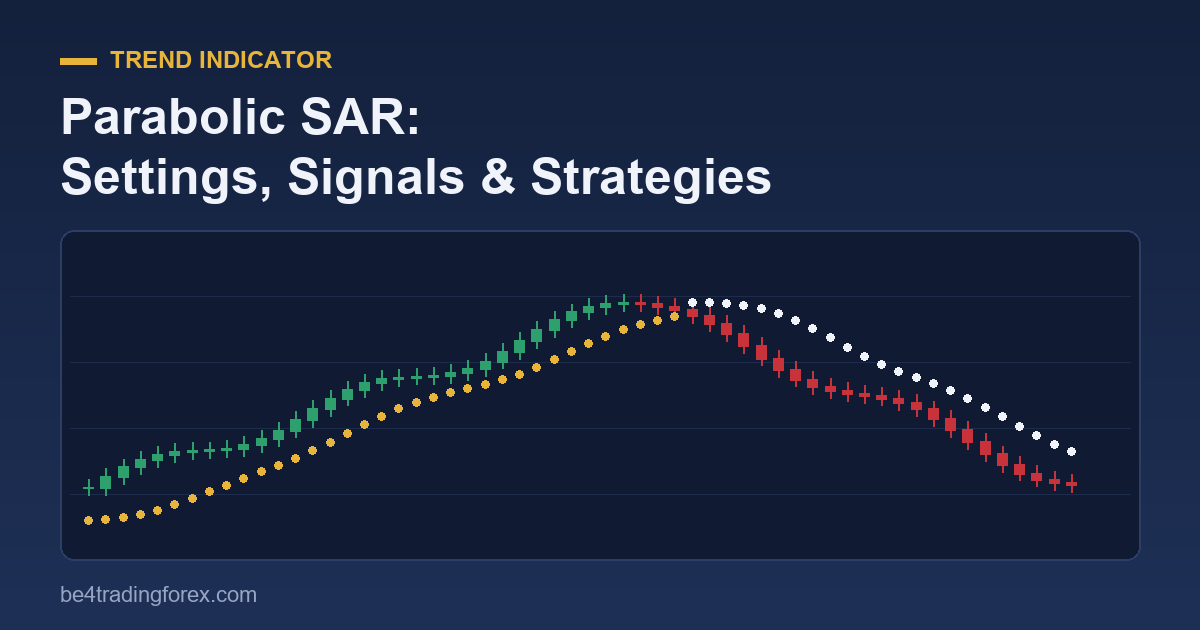
What Is the Parabolic SAR?
The Parabolic SAR was developed by J. Welles Wilder Jr., the same analyst who created the RSI and the ATR, and published in his 1978 book New Concepts in Technical Trading Systems. “SAR” stands for Stop And Reverse: Wilder designed it as a system that is always in the market, with the dots acting as a stop loss that, once hit, closes the trade and opens one in the opposite direction.
It is called “parabolic” because, in a strong trend, the dots accelerate towards price and form a curve that looks like a parabola. The longer a trend runs, the faster the stop tightens.
- Dots below the candles: the indicator considers the market to be in an uptrend.
- Dots above the candles: the indicator considers the market to be in a downtrend.
- A flip (dots switching sides) happens when price touches the current SAR level.
How the Parabolic SAR Is Calculated
Each new SAR value moves towards the trend’s extreme price by a fraction called the acceleration factor (AF):
Next SAR = Current SAR + AF × (EP − Current SAR)
- EP (extreme point) is the highest high of the current uptrend, or the lowest low of the current downtrend.
- AF starts at 0.02 and increases by 0.02 every time a new extreme point is made, up to a maximum of 0.20.
- In an uptrend, the SAR is never placed above the lows of the previous two candles (and in a downtrend never below their highs), so the stop always sits outside recent price action.
- When price crosses the SAR, the trend reverses: the new SAR starts at the previous trend’s extreme point and the AF resets to 0.02.
This is why the dots start far from price at the beginning of a trend and close in quickly as the trend extends: the AF keeps growing with every new high or low.
Parabolic SAR Settings
In MetaTrader 4 the indicator has two inputs: Step (the AF increment and starting value) and Maximum (the AF cap). Wilder’s defaults are 0.02 and 0.2.
| Step / Maximum | Behaviour | Best for |
|---|---|---|
| 0.01 / 0.1 | Slower: dots stay further from price, fewer flips | Swing trading, riding long trends |
| 0.02 / 0.2 (default) | Balanced | Most timeframes, trailing stops |
| 0.04 / 0.4 | Faster: dots hug price, many flips | Scalping with a strong filter |
A larger step does not make the indicator “better”; it trades fewer false signals for later exits, or the reverse. Test any change on a demo account over at least 30 trades before using it live.
To add it in MT4: Insert → Indicators → Trend → Parabolic SAR.
How to Read Parabolic SAR Signals
- Buy signal: the dots flip from above price to below price.
- Sell signal: the dots flip from below price to above price.
- Trend strength: a widening gap between the dots and price shows a trend that is accelerating; dots flipping every few candles show a market without direction.
- Stop level: the current dot is a ready-made stop loss for a trade in the direction of the trend.
The weakness is clear from the formula: because the SAR is always long or short, it keeps flipping when the market moves sideways, producing a string of small losses. Every reliable Parabolic SAR strategy adds a filter that keeps you out of ranges.
Strategy 1: Trend Following with a 200 EMA Filter
This is the simplest way to cut out counter-trend signals.
- Add a 200-period exponential moving average to an H1 or H4 chart.
- Only take buy flips when price is above the 200 EMA, and only sell flips when price is below it.
- Enter at the close of the candle that flips the dots.
- Place the stop loss at the first new SAR dot, and size the position so that distance risks no more than 1–2% of your account. Our ATR position-sizing guide shows how to calculate the lot size.
- Exit when the dots flip against you.
Strategy 2: Parabolic SAR as a Trailing Stop
Many traders never use the SAR for entries at all. They enter with another tool (a breakout, a moving-average cross, a support bounce) and then move the stop loss to each new SAR dot. Because the dots accelerate, the stop tightens automatically as the trend matures and locks in more profit the longer the move lasts. For other ways to trail a stop, including fixed-pip and ATR-based methods, read how to set a trailing stop in MT4.
Strategy 3: Parabolic SAR + ADX to Avoid Ranges
The Average Directional Index (also created by Wilder) measures trend strength regardless of direction. A common rule:
- Take Parabolic SAR flips only when the ADX (14) is above 25, which signals a trending market.
- Ignore flips when the ADX is below 20; the market is likely ranging and the SAR will whipsaw.
- Use +DI above −DI as extra confirmation for buys, and the opposite for sells.
Strategy 4: Parabolic SAR Scalping
On M1 to M15 charts the Parabolic SAR flips often, so scalpers pair it with a second indicator that confirms momentum. We have three complete scalping systems built around it, each with entry, exit and stop rules:
- Scalping with Parabolic SAR and CCI, where the CCI confirms momentum.
- Scalping with Parabolic SAR and Fibonacci, which enters on pullbacks to Fibonacci levels.
- Parabolic SAR Trend Scalper trading system.
Scalping magnifies costs: on short timeframes the spread and commission can be a large share of each target. Trade the most liquid pairs during the London and New York sessions, and forward-test on demo first.
Common Mistakes
- Trading every flip. In a range, the SAR can flip five or six times in a row. Always use a trend filter.
- Ignoring the timeframe. A flip on M5 means little against a strong H4 trend. Check the higher timeframe first.
- Using it alone for exits in slow trends. Because the dots accelerate over time, a slow, steady trend can stop you out early. A wider setting or an ATR-based stop may suit those markets better.
- Risking too much. The first dot after a flip can be far from price. Size the position from the stop distance, not the other way around.
Parabolic SAR FAQ
What is the best setting for the Parabolic SAR?
Wilder’s default of 0.02 step and 0.2 maximum works well on most timeframes. Lower values (0.01/0.1) suit longer trends; higher values (0.04/0.4) suit scalping but produce more false signals.
Is the Parabolic SAR a leading or lagging indicator?
It is a lagging, trend-following indicator: it reacts after price has moved. That is why it works best for trailing stops and for trading in the direction of an established trend.
What timeframe is best for the Parabolic SAR?
It is most reliable on H1, H4 and daily charts, where trends last longer. On lower timeframes it needs a filter such as the ADX or a 200 EMA.
Can the Parabolic SAR be used for scalping?
Yes, combined with a momentum filter; see the three scalping systems linked above. Without a filter, its frequent flips make scalping costly.
Prefer to learn by watching? See our Parabolic SAR video lesson.
Keep learning